
Labels:
LG,
Optimus L9
How to ROOT LG OPTIMUS L7, LG OPTIMUS L5, LG OPTIMUS L9(all country) EASY FROM YOUR PC ON 4.1.2 or the old 4.0.3
i am not responsive for all problem of your phone (errors/brick/explosion) follow this guide at your risk,read other threads and other informations before root your smartphone,ale read MORE INFORMATION* AFTER THE GUIDE, you can brick it!i am nor responsive about your problems!!
LET'S GO
Need
-PC(windows or lunux)
-PHONE(HAHAHAH)
-driver (find it on lg websites in your phone pages)
-this file CYDIAIMPACTOR
LINK DOWNLOAD:
MAC OS https://cydia.saurik.com/api/latest/1 WINDOWS https://cydia.saurik.com/api/latest/2
LINUX 32BIT https://cydia.saurik.com/api/latest/4
LINUX 64BIT https://cydia.saurik.com/api/latest/5
Guide
0.your phone driver must be installed on your pc!
1.download this zip files and extract it on your desktop
2.enable usb debug on your phone(setting/developper/debug usb)
3.connect your phone to your pc
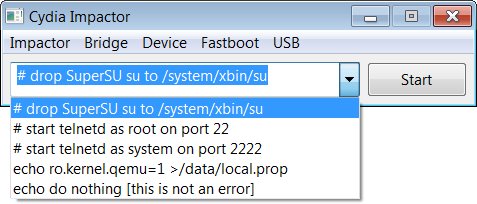
4.open IMPACTOR.exe (you extracted it on your desktop)
5.press start
FINISH!!!! your phone got ROOT ACCESS
now you can reboot your phone and install from play store(for future updates) SUPERSU, i have got no luck with SUPERUSER.
SECURITY INFORMATION
root access dont work without a root permission manager(SUPERSU or SUPERUSER), i hope you download it from playstore so you can get official updates!
after you install SUPERSU(or superuser) you can use ROOT APPS(you must buy or download them!)
for example some root apps are:
-android terminal emulator(terminal/cmd)
-busybox(install unix command)
-root explorer(filemanager with root permission)
-lucky patcher(apps manager!-move obb to externelSD(directorybinder))
-root check(verify root access)
-link2sd(need 2nd partion on sdcard,move app on sd)
-seeder(no luck with my phone) or seelagfix(no luck on my devices)
-ram manager(tweek for ram)
-system tuner pro(apps manager! and system)
-titanium backup
-setcpu(underclock,for overclock you must have a custom kernel)not all root apps are compatible with our phone or our android version! use it at your risk
after root you should disable debug usb! malicious malware can enter into your device from virus if you had ii/them on your pc!
this method is builded by saurik! (i hope you know about CYDIA on JAILBREAK IPHONE/IPAD)
cydia dont exist on android, it is only a project by his pioneer SAURIK(hi my friend!)
cydia instructor follow an android bug from android 1.5 to 4.2 today google block it, it mod app without change official keys!
root dont make your phone faster! you must mod your phone, a little example to get a faster phone can be unistall system apps that arent used, block auto start on boot of user apps, block stupid user apps event! maybe you can use system tuner pro and click on EVENT(block or unistall only things you know, internet is very bigger!!! )))
WITH THIS METHOD BOOTLOADER ISNT UNLOCKED AND YOU HAVENT CWM!!!!
you must do others steps!
tested on l7 p700 end l5 e610 4.1.2 v20d!!
*ALL INFORMATIONS
Cydia Impactor is a GUI tool for working with Android devices. It has features already, but is still very much a work-in-progress.
Right now, its key feature is an end-to-end exploit of the Android "Master Key" vulnerability, allowing a user to obtain root access on many Android devices (including Glass and TV).
Download Cydia Impactor for Mac OS X, Windows, Linux (32-bit), or Linux (64-bit). (These URLs will always redirect to the most recent versions, so feel free to directly link to the packages from howto guides.)
If you are on Windows, you may have to install a device driver to talk to your device over USB. If your device is not detected, use Impactor's USB Driver Scan feature to attempt to automatically construct and install a driver for your device. You do not need the Android SDK.
To download new versions, use "Check for Updates..." under the Impactor menu from inside of the application. Impactor will also occasionally prompt about new versions that come out. (This feature is currently not available in the Linux versions.)
If you are having problems using Cydia Impactor (it crashes, doesn't work on your device, or simply doesn't make any sense) please join #android on irc.saurik.com and ask a question.
The Android "Master Key" vulnerability was found by Bluebox Security. For more information on how this bug works, I have done an overly-detailed article on the exploit technique.
If that bug is not available, Impactor will instead attempt to use a different signature verification bug. For more information on how that bug works, I have done another article on the new exploit.
It is possible that your device has been patched against both bugs; Impactor will inform you of this. If you'd like to check before spending time working with Impactor, you can try either the Bluebox Security Scanner or the alternative SRT AppScanner (which I have found to provide fewer false positives than Bluebox's tool).
Also, root access isn't sufficient on some devices, as they require kernel patches (the Samsung Galaxy S4 is a good example of this problem).Device Also known as LG Optimus L9 II D605
![[Guide] How to Root LG Optimus L9 II (D605)](http://cdn2.gsmarena.com/vv/pics/lg/lg-optimus-l9-ii-new.jpg "[Guide] How to Root LG Optimus L9 II (D605)")

0 comments:
Leave a Reply